Enable subscriptions for a product
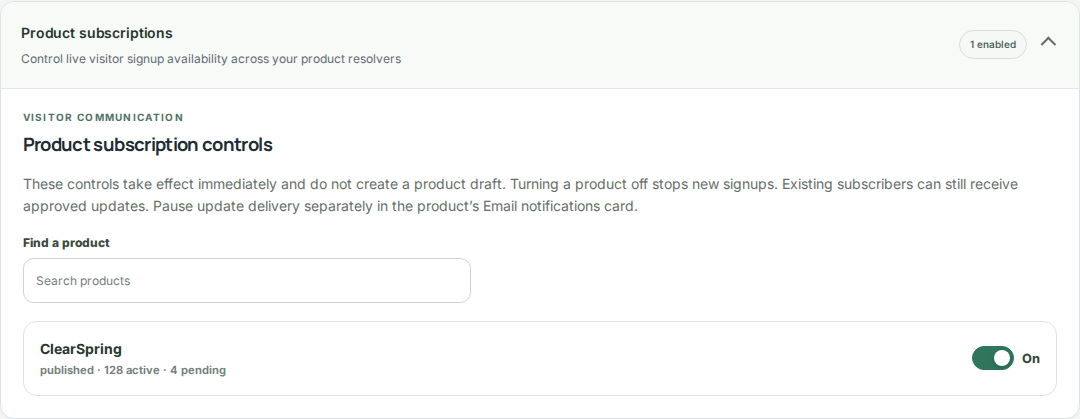
Subscriptions start disabled. An account administrator enables signup from the product notification card or Compliance workspace when the feature is available.
- Choose the product whose updates visitors should receive.
- Enable product update signup using the administrator controls.
- Open the public product resolver and confirm the signup form is available.
Understand visitor consent
A visitor subscribes to one product using an email address and confirms through a double opt-in message. An unconfirmed signup is not an active subscription.
- Explain the product-specific nature of the updates in your communications.
- Use the confirmation flow when checking signup behavior.
- Use aggregate consent and delivery counts to monitor activity.
Prepare and release an announcement
Prepare the announcement alongside the product change. In the change review flow, Authors enter the exact subject and summary in Review & submit changes, and Publishers review them with the rest of the update.
- Save the product changes before preparing the release.
- Write a subject and summary that accurately describe the published update.
- Review the announcement together with the changed content.
- Publish through your workspace’s normal process; the approved announcement is queued with the release.
Manage signup and delivery separately
Turning signup off stops new subscriptions; it does not remove existing subscribers or prevent approved updates from reaching them. Product delivery pause holds queued update emails until resumed.
- Turn off signup when you want to stop accepting new subscribers.
- Use delivery pause when update messages need to wait.
- Review delivery counts and resolve operational issues before resuming.